Let's talk


Enterprise software · Document management · Design system in Figma
For the maker of an enterprise document-management and workflow platform, we stopped drawing the variant and state matrix of a configurable component by hand and had an agent generate it in Figma straight from the code prototype. The designer designs the system, writes the prompt and reviews the result; the agent does the production. Code and design system stay in sync.

At the maker of an enterprise document-management and workflow-automation platform, a configurable workflow component needed every combination of four source types, four destination types and several interaction states in Figma. Instead of drawing that matrix by hand, we — as an employee, in the role of Lead Product Designer — set up an agentic workflow: the code prototype is the single source of truth, an AI agent in Cursor generates the component set with every variant and state in Figma through an MCP bridge, and the designer writes the prompt and reviews every result. The repetitive production work disappears; code and design system stay in sync.
This matters to product teams in enterprise software because almost every complex component is such a matrix: configurations, states, and later brands, themes and platforms. Maintaining it by hand burns designer time on duplication and risks Figma and code drifting apart. This case shows which steps an agent handles reliably, where the human stays in the loop, and how quality is secured.
These numbers describe the size of the variant matrix as recorded in the case documentation. There was no before/after time measurement in the project; we deliberately do not estimate one.
Case documentation in the portfolio (Context section)
Case documentation in the portfolio (Problem section)
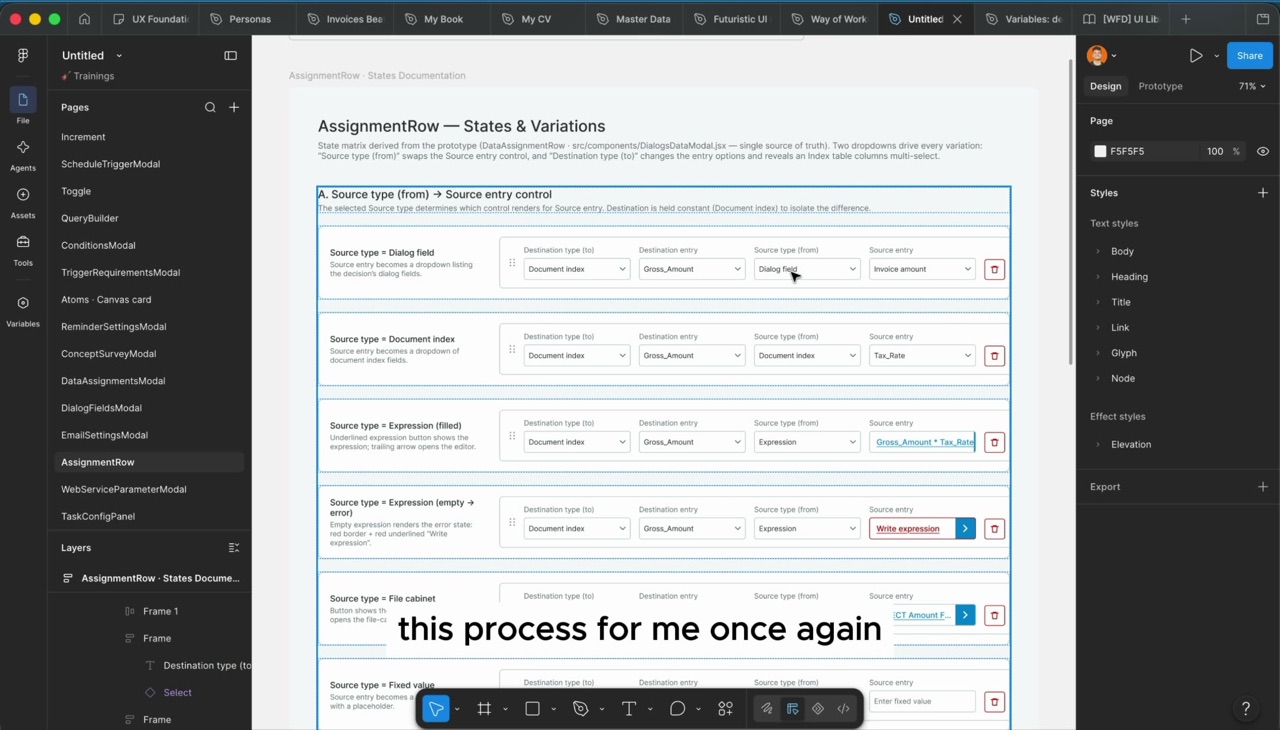
Case documentation in the portfolio (Figma page “States & Variations”)
What was the starting point? A mature enterprise platform with an established design system — and one component that changes with every selection.
The work was done as an employee, in the role of Lead Product Designer, at the maker of an enterprise platform for document management and workflow automation. Products of this kind are configured by business departments and administrators, not programmed: a single dialog has to cover dozens of configuration paths, and the design system has to know every one of them so that product management, design and engineering talk about the same picture.
The surface in this case is a configuration dialog in the workflow designer that assigns data from a source to a destination field. Its core building block is a configurable row we call AssignmentRow here: a series of dropdowns that decides where a value comes from and where it is written. Choose an expression as the source and you get an input field for the formula; choose a dialog field and you get a pick list; choose a fixed value and you get a text field. The component never sits still — depending on the selection, more dropdowns appear, options change and new states show up.
For the design system, this is the classic case of a variant matrix. Such axes are common in B2B design systems: configurations like here, states, density levels, brands, themes and platforms. Every axis multiplies the number of frames someone has to create, name and maintain in Figma. For this component it was four source types, four destination types and several interaction states — enough to turn manual upkeep into a permanent job.
At the same time, the component already existed in code: as a prototype with clean state logic from which every variant can be derived. That was the decisive starting point. There was a source of truth; it just lived in the code rather than in Figma. The question was how the design system could benefit from it without someone redrawing the logic a second time by hand.
What Beabstracto takes from this work to clients: the experience of introducing an agentic tool into a real, mature design system — with review responsibility staying with the designer, with engineering as a partner, and with a handover that a junior team can carry forward.
What was the problem? Designing every variant and state of this component by hand was slow, repetitive and did not scale — and with every change to the product, the work started over.
AssignmentRow is not a single view but a matrix. Each source type renders a different control, and each combination with a destination type has its own states: filled, empty, error, dropdown open, row dragging. Mapping that completely means drawing dozens of frames for a single row.
Duplicating, renaming and maintaining variants in Figma is exactly the manual work that eats designer time without improving a single product decision. The team should spend its time on problem-solving, not duplication.
As soon as the component evolves in code, the design file is out of date. Then product management, design and engineering argue over different pictures of the same component — and the alignment costs more than the change itself.
This component is one of many complex data models and configuration patterns that B2B SaaS products work with. A solution that only works for this one row would have little value. What we needed was a way of working that transfers to any complex component.
First attempts with AI tools typically fail not because of the tool but because of the brief: too little context, no clear location in the design file, no examples of the expected structure. Without a repeatable way to brief the agent, the result stays a matter of luck.
How did we go about it? With an agentic workflow in Cursor and an MCP bridge into Figma — and with a clear division of labour: the human designs the system, writes the prompt and reviews; the agent generates. Three roles, kept straight: the AI agent, which does the work and is the one you talk to through the prompt; Cursor, the development environment where the agent runs; and MCP, the interface through which the agent creates and updates components in Figma.
Before an agent generates anything, it has to be clear what should be generated. We defined the component with its variants and states as one source of truth — not as a collection of individual screens. The state matrix was derived from the code prototype: two dropdowns drive every variation, the source type swaps the source control, the destination type changes the destination options. This structure is the foundation for everything that follows, including the documentation in Figma. Owner: the designer, in exchange with engineering.
Through the MCP bridge, the agent generates the base component in Figma — pulled from the prototype in code, driven from Cursor. It starts as a single variant. This step is small but decisive: it ensures Figma has the same structure as the code from the start, rather than a tracing of it. Owner: the agent; the designer checks structure and naming.
The prompt is the actual brief. Four things proved decisive: include the link to the Figma file or the specific section so the agent knows exactly where to work; give as much context as possible about the component and how it behaves; attach output examples so the result matches the intended structure; and add hints about the variants and states to create. We are turning these four points into a reusable guideline for other designers — honestly a work in progress, with still a lot of gut feeling involved. Owner: the designer.
The agent maps all variants and states of the component at once — in a single component set in Figma, generated from the prototype and respecting the project's data model. It builds nothing from scratch; it derives. The Figma page “States & Variations” documents the result so it stays verifiable: each section varies one dimension and holds the other constant, so the difference is isolated and visible. Owner: the agent.
The agent delivers, the human is accountable. Every generated component set is checked by the designer against the prototype: are the controls right for each source type, are the states complete, does the structure of the set fit the design system, are naming and arrangement such that the team can work with it? Whatever does not fit is corrected in the prompt and regenerated — not redrawn by hand, or the source of truth breaks. Owner: the designer, with engineering as a second pair of eyes on the data model.
The reviewed work was framed and handed over to a junior design team for final polish, together with the prompt guideline and the short process video that shows the path from a single variant to the complete matrix. That makes the workflow independent of one person and lets it be applied to the next complex component. Owner: the Lead Product Designer.
What was the outcome? Not a flashy tool but a way of working: the repetitive variant work is automated, the design system stays consistent, and the prototype keeps pace with the product — because design and code share one bridge.
| Aspect | Before | After |
|---|---|---|
| Creating variants and states | Every combination of source type, destination type and state drawn, duplicated and named by hand in Figma | The agent generates the complete component set in one pass from the prototype |
| Source of truth | Scattered screens; Figma and code describe the same component differently | The code prototype is the single source; Figma is derived from it |
| The designer's role | Production: duplicating, maintaining, aligning | Designing the system, writing the prompt, reviewing the result, making decisions |
| A change to the component | Rework in every affected frame, often delayed | Adjust the prompt, regenerate, review |
| Knowledge about briefing the agent | Gut feeling, from attempt to attempt | Four-point checklist as a guideline for other designers (in progress) |
| Handover to the team | Knowledge held by one person | Framed work plus guideline and process video for a junior team |
The mechanical work — duplicating frames, redrawing states, aligning names — disappears. What remains is the demanding work: defining the system cleanly, briefing the agent precisely, reviewing the result critically.
Because Figma is derived from the prototype and respects the project's data model, the team discusses the same component. The design system becomes something engineering can actually build and maintain — not an interpretation of it.
A complex, configurable component is managed as a component set with clearly named variants and states — one source of truth instead of scattered screens. That is the foundation on which further axes such as brands or themes stay clean.
The same approach works for any complex component. Prompt guideline, process video and the handover to a junior team make the way of working independent of a single person.
Using AI agents costs money — compute and licences. The sum works out when the time gained flows into problem-solving and product decisions, not into even more production.
Automation multiplies what is already there — including mess. The workflow worked because the component existed in code as a prototype with clean state logic and the matrix was defined beforehand. Start with the agent before the system is defined and you quickly get many frames and little consistency. For design-system teams this means: first settle where the truth lives — in code, in tokens or in Figma — and only then automate.
Four things decide the result: the location in the design file, the context about the component and its behaviour, output examples for the expected structure, and hints about the desired variants. That is the same discipline as a good brief to a new colleague. We capture these points as a guideline so other designers do not start from zero — and say openly that it is still growing.
Everything the agent generates goes through the designer's review, with engineering as a second pair of eyes on the data model. Corrections happen in the prompt and by regenerating, not by redrawing by hand — otherwise a second truth appears again. This rule is the real quality mechanism, not the tool.
The gain did not come from a better Figma plugin but from thinking of the component as a matrix and of the design system in atomic principles. Those who know the principles can tell the agent precisely what to build — and spot immediately when the result deviates from the system.
The work was framed and handed to a junior team when the workflow was running, not when it was perfect. With the guideline and the process video, the team could take over the final polish and apply the approach to further components. For Beabstracto's clients this means: we build ways of working that stay with the team, not dependencies on an external consultant.
We define the variant matrix, connect code and Figma, and set up a workflow in which the agent produces and your team decides.
Book an intro call